

Sutro Functions
Sutro Functions are task-specific judges, classifiers, and extractors that are robustly aligned with your decision preferences, easy to build, and easy to maintain.. You describe a task in plain language, upload a representative sample of your data, and Sutro surfaces the inputs where the right answer is most ambiguous. You label those cases, explain your reasoning when the decision is subjective, and Sutro optimizes a prompt that matches your preferences. The result is a deployable function you can invoke by name. However, its also more than that: every model built in Sutro also builds its own record book of ground truth values that can continuously be used to measure future iterations against. This also means that prompt regressions and fragility is no longer a concern. Each Function’s record book can be continuously added to, and quickly re-optimized against; leading to a model that has the context to make the right decision every time, even as your data changes.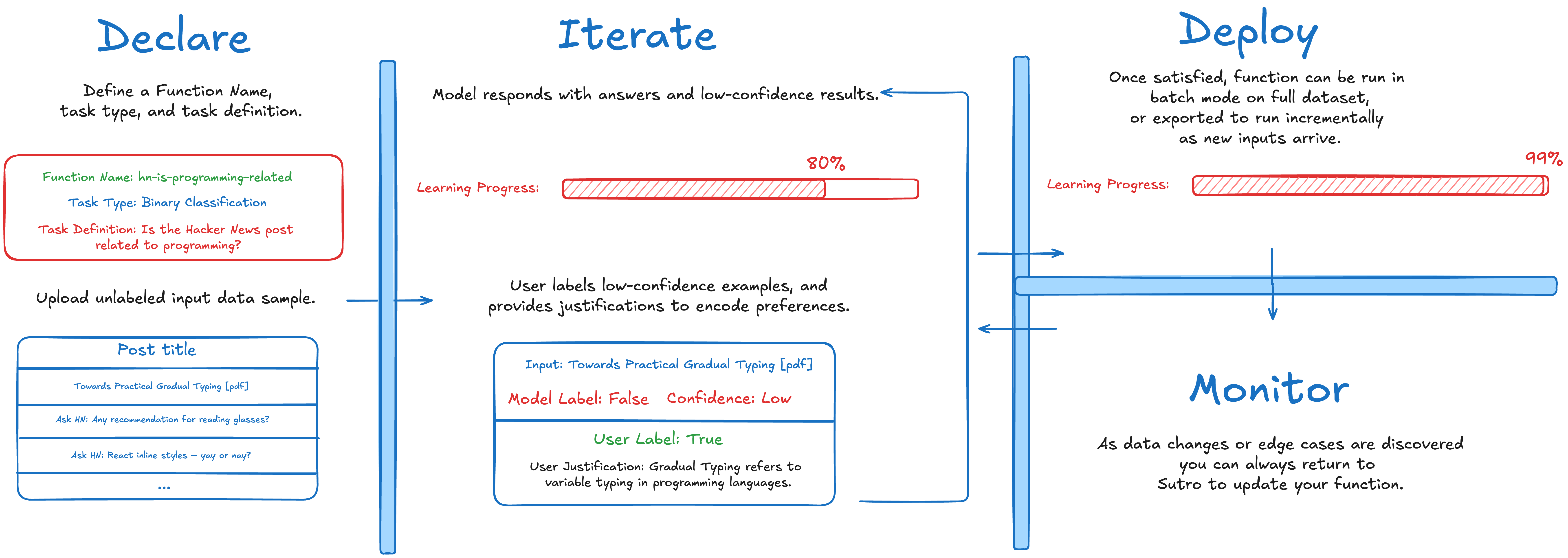
“Eval hell”
When trying to build LLM systems, we often find teams in a place we like to call “eval hell”. What it usually looks like is someone has a prompt (they might’ve hand written, had Claude write it,, etc), and it sort of works. However, they keep running into new edges cases - either in testing or production - where it fails. They then enter a painful spiral of prompt engineering whack-a-mole, where they try to fix one issue, only to see another pop up. With Sutro Functions we want to build a better way.Supported task types
Currently, Functions is mainly focused on helping people improve decision models. Which we support in the following ways:- LLM-as-a-judge — evaluative judgments like
pass, failorhighly_relevant, relevant, not_relevant - Binary classification — true/false decisions (e.g. “is this lead qualified?”)
- Single-label classification — one label from a set you define (e.g. support ticket category)
- Multi-label classification — multiple labels per input (e.g. content tags)
- Structured extraction — pull named fields from text into a schema
Executing a Function
Once a Function is deployed, invoke it by name:- Python SDK for SDK helpers around both APIs
- Batch API for asynchronous jobs over many rows
- Functions Flex Processing API for singleton requests on a flexible time scale
Next steps
Core Workflow
Understand the create → predict → label → optimize loop.
Designing Your Task
How to break down your goal into well-scoped tasks.
FAQ
What if I already have labeled data?
What if I already have labeled data?
Existing labels can seed the process, but we still recommend labeling the cases Sutro surfaces and providing justifications where the task is subjective. This ensures the function learns your preferences, not just your historical labels.
How long does it take to create a function?
How long does it take to create a function?
Most functions converge in 2-4 iterations. Each iteration takes a few minutes of compute plus your labeling time. The total time depends on how many items you label per iteration and how subjective the task is.
Can I update a function after deployment?
Can I update a function after deployment?
Yes. Return to the function at any time, add new data or labels, re-optimize, and redeploy.
How is this different from traditional ML classifiers?
How is this different from traditional ML classifiers?
Sutro Functions work on unstructured input data (text, images, etc.) and don’t require a pre-labeled training set. You start with zero labels and build them iteratively on the cases that matter most.
How complicated can a task be?
How complicated can a task be?
Keep tasks narrow. If the real business problem is complex, decompose it into several smaller functions rather than forcing one function to do everything. See Designing Your Task for guidance.